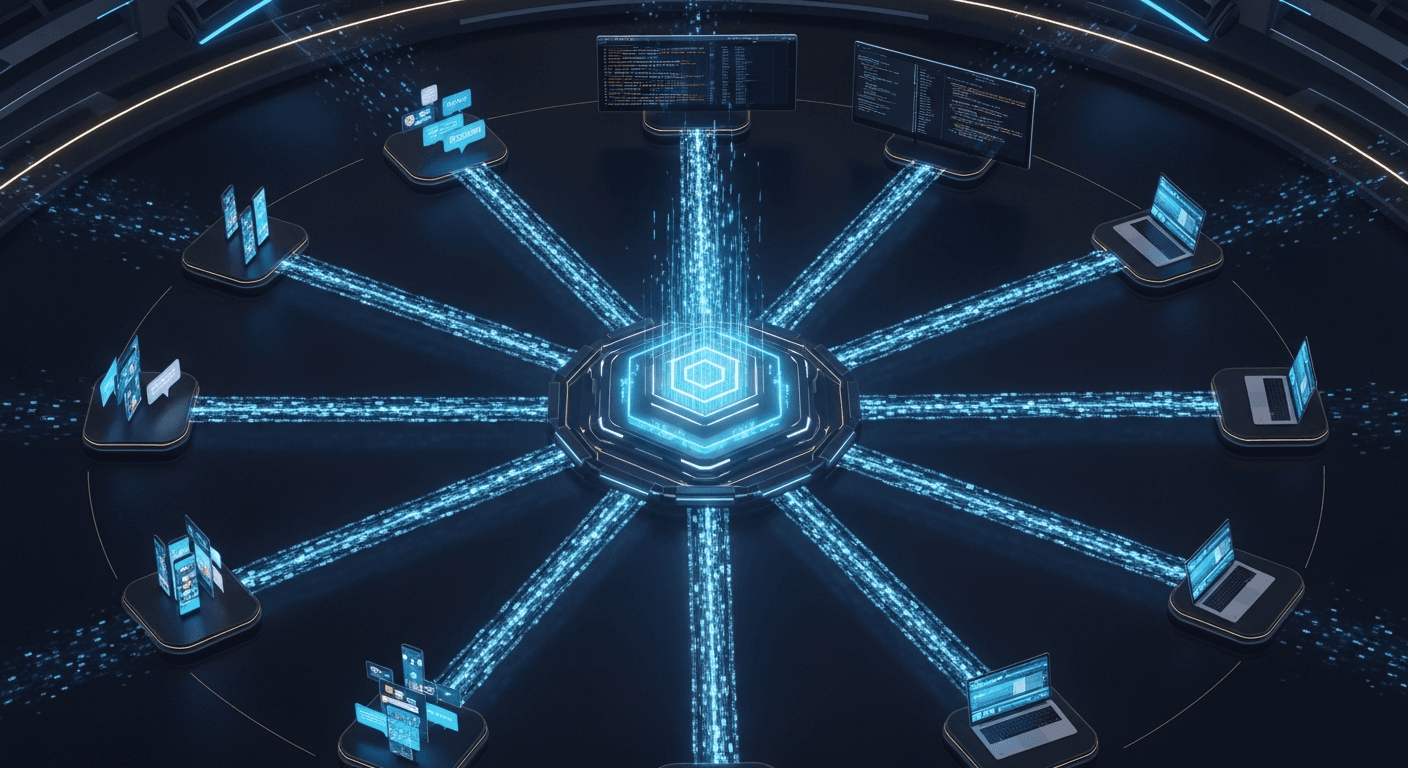
OpenClaw Deconstructed: A Visual Architecture Guide to the AI Agent Platform With 145k GitHub Stars
Six annotated infographics that map every layer of OpenClaw's architecture — from the gateway server to the 9-layer tool policy engine — enriched with real source-code references and design patterns from all 4,885 files.
Six annotated infographics that map every layer of OpenClaw's architecture — from the gateway server to the 9-layer tool policy engine — enriched with real source-code references, function signatures, and design patterns from all 4,885 files.
OpenClaw is the fastest-growing open-source AI agent platform in history. 145,000 GitHub stars. 4,885 source files. 6.8 million tokens of TypeScript, Swift, and Kotlin. A gateway that connects 16+ messaging channels to 60+ agent tools through a WebSocket server that never sleeps.
But understanding this platform from a README isn't enough — not if you're planning to build on it, fork it, or integrate your product into its ecosystem.
So we did something different. We mapped the entire codebase, generated six architectural infographics, then went back into the source code to annotate every layer with the actual functions, interfaces, and design patterns that make it work.
This is the visual guide to OpenClaw's architecture. Each infographic is paired with deep source-level context that shows you not just what the system does, but how it does it and where in the code it lives.
1. The Complete Architecture: How Everything Connects
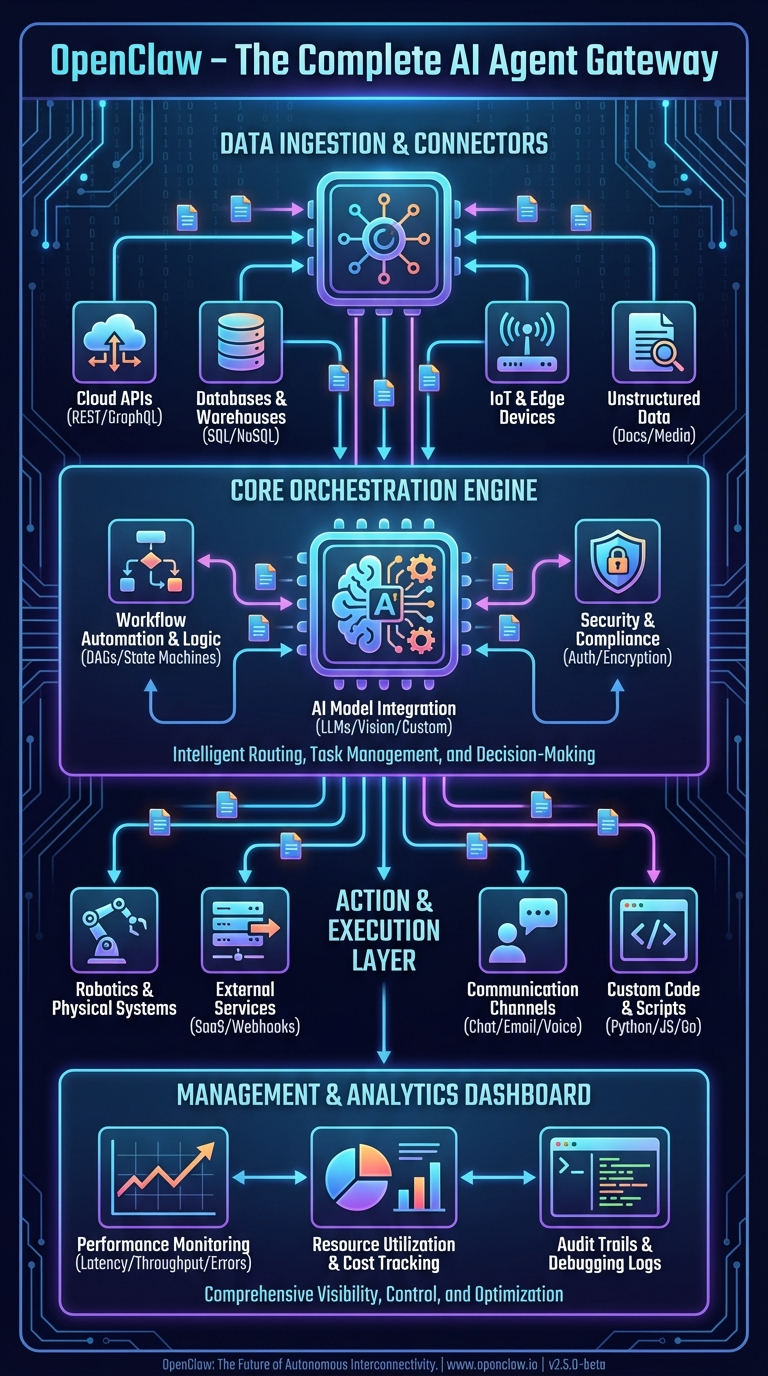
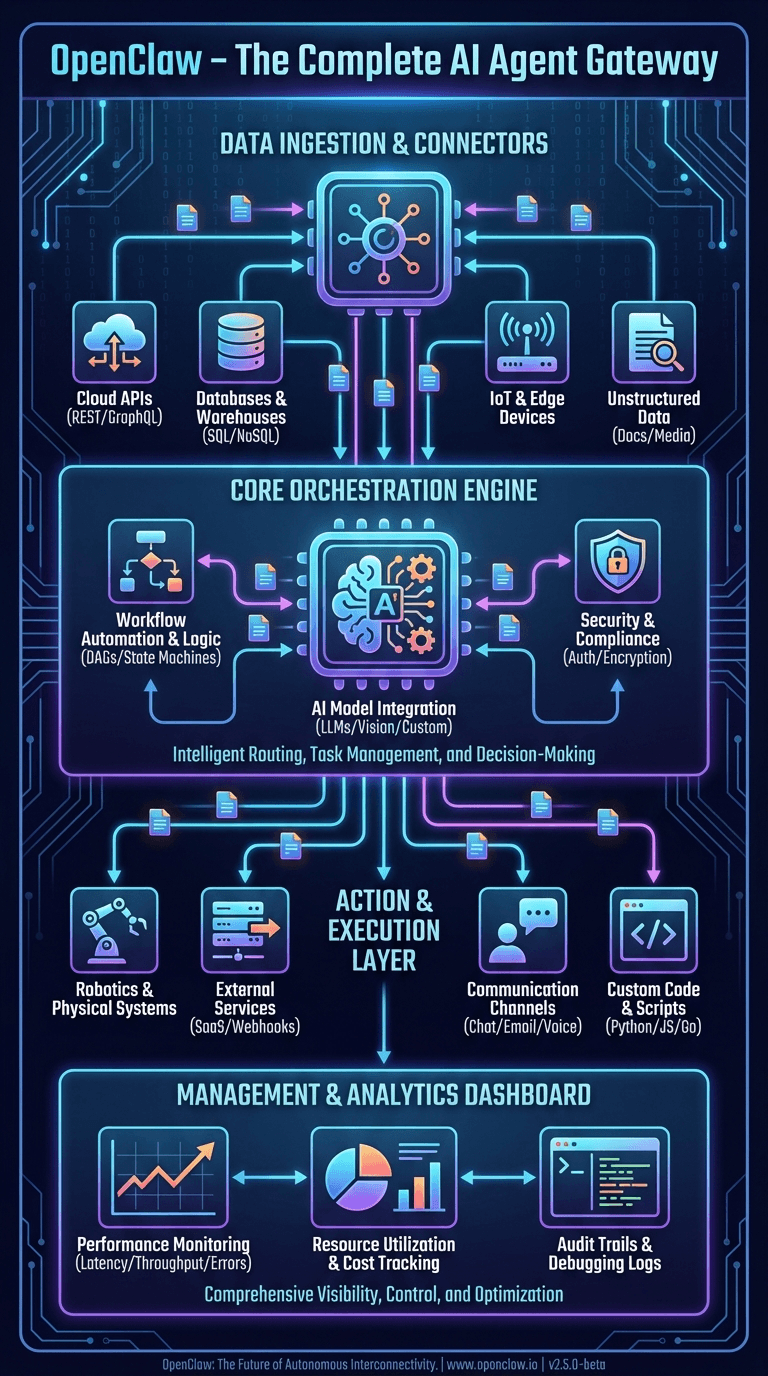
This first infographic shows OpenClaw's complete system architecture as a layered stack. Let's trace it top to bottom with real codebase references.
Data Ingestion & Connectors Layer
At the top of the architecture sits the ingestion layer — the surface area where OpenClaw meets the outside world. The infographic shows Cloud APIs, Databases, IoT & Edge, and Social Media connectors feeding into the system.
In the actual codebase, this translates to 20+ channel extensions in the extensions/ directory, each implementing the ChannelPlugin interface defined in src/channels/plugins/types.plugin.ts. The official docs describe it plainly:
"OpenClaw is a self-hosted gateway that connects your favorite chat apps — WhatsApp, Telegram, Discord, iMessage, and more — to AI coding agents like Pi."
The raw numbers by integration size:
| Channel | Location | Codebase Size |
|---|---|---|
| Telegram | src/telegram/ + extensions/ext-telegram/ |
~150,000 tokens |
| Discord | src/discord/ + extensions/ext-discord/ |
~120,000 tokens |
| Slack | src/slack/ + extensions/ext-slack/ |
~100,000 tokens |
| iMessage | extensions/ext-bluebubbles/ |
~87,000 tokens |
| Voice Call | extensions/ext-voice-call/ |
~73,000 tokens |
| MS Teams | extensions/ext-msteams/ |
~69,000 tokens |
| LINE | extensions/ext-line/ |
~42,000 tokens |
| Matrix | extensions/ext-matrix/ |
~38,000 tokens |
| Nostr | extensions/ext-nostr/ |
~35,000 tokens |
| Signal | extensions/ext-signal/ |
~32,000 tokens |
extensions/ext-whatsapp/ |
~30,000 tokens |
Plus: Google Chat, Feishu, Zalo, Mattermost, Nextcloud Talk, Tlon, Twitch, and XMPP — each with dedicated extension packages.
Core Orchestration Engine
The center of the infographic — the "Workflow Automation & Logic," "AI Model Integration," and "Intelligent Routing, Task Management, and Decision-Making" blocks — maps to three core modules:
The Gateway (src/gateway/server.impl.ts) is the single process that owns everything. The startGatewayServer() function boots the WebSocket/HTTP server on port 18789, loads all plugins, starts channel monitors, initializes the cron service, and begins mDNS broadcasting.
The Auto-Reply Pipeline (src/auto-reply/) is the routing and decision-making engine. The getReplyFromConfig() function in src/auto-reply/reply/get-reply-run.ts orchestrates the entire message-to-response flow through 7 stages: ingestion, authorization, debouncing, session resolution, command detection, agent dispatch, and block streaming.
The Agent Executor (src/agents/pi-embedded-runner.ts) runs the actual LLM interaction loop. The runEmbeddedPiAgent() function manages workspace resolution, auth profile rotation, tool policy enforcement, context window management, and automatic compaction.
The official docs describe the core philosophy:
"A single long-lived Gateway owns all messaging surfaces. Control-plane clients connect to the Gateway over WebSocket on the configured bind host."
Action & Execution Layer
The bottom execution layer — Robotics & Physical Systems, External Systems, Communication, Custom Code — corresponds to the 60+ agent tools in src/agents/tools/ and the node system that connects to native devices.
Tools are organized into groups defined in the docs:
group:runtime— exec, bash, processgroup:fs— read, write, edit, apply_patchgroup:sessions— sessions_list, sessions_history, sessions_send, sessions_spawn, session_statusgroup:memory— memory_search, memory_getgroup:web— web_search, web_fetchgroup:ui— browser, canvas
The node system allows macOS, iOS, and Android devices to register as execution targets, exposing capabilities like camera capture, screen recording, GPS location, and calendar access through the nodes.invoke gateway method.
Management & Analytics Dashboard
The management layer maps to the Control UI (ui/ directory), a Lit web component SPA served directly by the gateway. The docs describe it:
"The Control UI is a small Vite + Lit single-page app served by the Gateway. It speaks directly to the Gateway WebSocket on the same port."
The dashboard provides real-time session monitoring, configuration editing (auto-generated from the Zod schema), channel health status, and tool execution approval flows.
2. The Agent Engine: OpenClaw's Brain
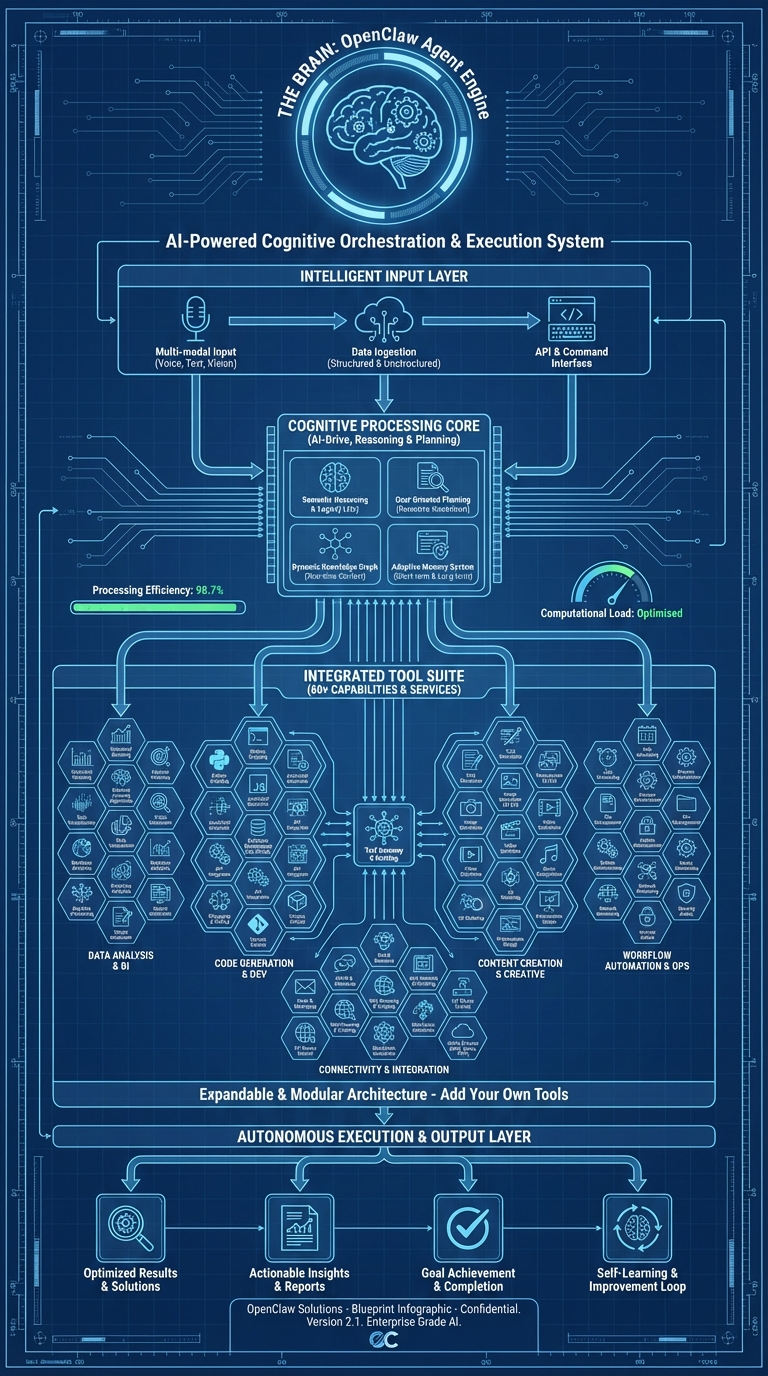
This infographic maps the cognitive architecture — how OpenClaw's agent receives input, reasons, selects tools, and produces output. It's labeled "AI-Powered Cognitive Orchestration & Execution System."
Intelligence Input Layer
The top of the infographic shows five input sources: File System, Web Content, Chat Messages, System Events, and Memory/History. In the codebase, these are the context sources assembled by the system prompt builder in src/agents/system-prompt/.
The system prompt isn't static — it's dynamically assembled from 17+ sections:
- Identity — Agent persona (customizable via
SOUL.md) - Tooling — Available tools filtered by the active policy
- Safety — Constitutional AI principles
- Skills — Loaded from bundled, managed, and workspace directories
- Memory — From
MEMORY.mdandmemory/*.mdfiles - Workspace — Current directory context and project files
- Runtime — Platform, model, channel metadata
The docs explain the memory philosophy:
"OpenClaw memory is plain Markdown in the agent workspace. The files are the source of truth; the model only 'remembers' what gets written to disk."
Memory files follow a specific pattern: memory/YYYY-MM-DD.md for daily logs (append-only), plus an optional MEMORY.md for curated long-term memory. When a session approaches compaction limits, OpenClaw triggers a silent agentic turn to flush important context to memory files before the conversation is summarized.
Cognitive Processing Core
The center of the infographic — Processing/Planning, AI Loop, Tool Selection, Context Management — maps directly to the agent execution loop in src/agents/pi-embedded-runner.ts:
runEmbeddedPiAgent()
  ├── Resolve workspace (per-agent or per-session)
  ├── Load config + select model
  ├── Rotate auth profiles (automatic failover on billing errors)
  ├── Build dynamic system prompt (17+ sections)
  ├── Create filtered tool set (60+ tools through 9-layer policy)
  ├── Enter agent loop:
  │   ├── Send prompt + tool definitions to LLM provider
  │   ├── Receive response (text and/or tool calls)
  │   ├── Execute tool calls (with policy + approval checks)
  │   ├── Append results to conversation history
  │   ├── Check context window limits (hard minimum threshold)
  │   └── Compact if necessary (automatic context summarization)
  └── Stream response blocks back to caller
The auth profile rotation system tracks billing errors per API key and rotates to the next available profile. The backoff window is configurable from 5 to 24 hours. The thinking level system supports reasoning modes (off, on, stream) and will automatically downgrade from xhigh to high to medium for models that don't support extended thinking.
Integrated Tool Suite
The tool grid in the infographic represents the 38 core tool implementation files in src/agents/tools/, plus additional tools registered by plugins. Every tool implements the same interface:
type AgentTool<TSchema, TContext> = {
  label: string;
  name: string;
  description: string;
  parameters: TSchema;        // TypeBox schema
  execute: (toolCallId: string, params: unknown, context?: TContext)
    => Promise<AgentToolResult>;
}
The tools docs confirm the design:
"OpenClaw exposes first-class agent tools for browser, canvas, nodes, and cron. These replace the old skills: the tools are typed, no shelling, and the agent should rely on them directly."
Key tool implementations include:
- browser-tool.ts — Full Playwright/CDP browser control (navigate, screenshot, evaluate, autonomous browsing)
- canvas-tool.ts — Rich UI rendering via A2UI protocol
- nodes-tool.ts — Device capability invocation (camera, screen, location)
- web-search.ts — Brave Search API with Perplexity fallback
- sessions-spawn-tool.ts — Sub-agent spawning with model inheritance
- cron-tool.ts — Gateway scheduled task management
- image-tool.ts — Image understanding and generation
- tts-tool.ts — Text-to-speech synthesis
Autonomous Execution & Output Layer
The bottom of the infographic shows General Tools, Special Agent, and Specialized Actions feeding into output. This corresponds to the sub-agent system (src/agents/subagent-registry.ts) and the block streaming mechanism.
The sub-agent registry manages child agents that can be spawned for parallel or specialized tasks. Each sub-agent inherits from its parent but can have restricted tool access through the subagent policy layer — the 9th and final layer in the tool policy cascade.
The docs explain multi-agent routing:
"An agent is a fully scoped brain with its own: Workspace, State directory (agentDir), Session store."
3. The Gateway & Message Pipeline: The Nerve Center
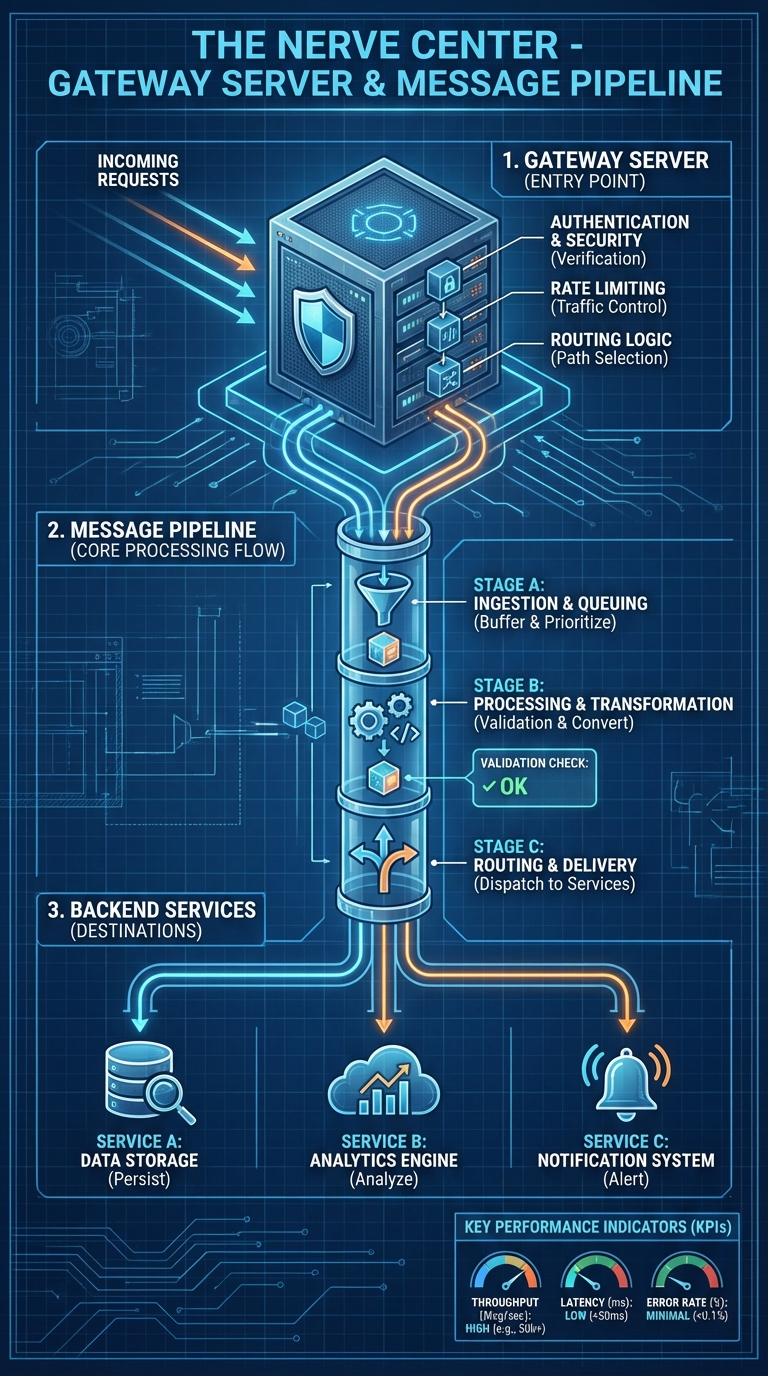
This infographic — "The Nerve Center" — traces the path from incoming request to delivered response. It's the most operationally critical diagram for anyone building integrations.
1. Gateway Server (Entry Point)
The infographic shows four gateway functions: Authentication & Security, Rate Limiting, Routing Logic, and File Handling.
In the codebase, the gateway server initializes in src/gateway/server.impl.ts through the startGatewayServer(port, opts) function. The startup sequence includes config validation, plugin loading, HTTP/HTTPS + WebSocket server creation, channel monitor startup, mDNS broadcasting, skill watcher initialization, health snapshots every 10 seconds, cron service startup, exec approval manager creation, and config hot-reload.
Authentication is handled in src/gateway/auth.ts with three modes:
- Token auth — Bearer token matching via
OPENCLAW_GATEWAY_TOKEN - Password auth — Username/password validation
- Tailscale identity — Zero-config auth via Tailscale network
The protocol docs specify:
"First frame must be
connect. Requests:{type:"req", id, method, params}→{type:"res", id, ok, payload|error}. Events:{type:"event", event, payload, seq?, stateVersion?}"
Rate limiting is implemented through lane-based concurrency control in src/gateway/server-lanes.ts and per-channel debounce configuration.
2. Message Pipeline Core Processing Flow
The infographic breaks the pipeline into three stages: A (Ingestion & Queuing), B (Processing & Transformation), and C (Routing & Delivery).
In the actual code, the pipeline lives in src/auto-reply/ with 121 implementation files:
Stage A — Ingestion & Queuing:
inbound.ts— Message ingestion from channelinbound-debounce.ts— Batching rapid messages from the same senderenvelope.ts— Message envelope wrapping (timestamp, timezone, elapsed time)- Queue management with 5 modes: steer, interrupt, followup, collect, steer-backlog
Stage B — Processing & Transformation:
command-auth.ts— Authorization checkscommand-detection.ts— Slash command detection (/status,/help)reply-directives.ts— Directive parsing (@audio-as-voice,@reply-to,@media)- Agent dispatch to
runEmbeddedPiAgent()
Stage C — Routing & Delivery:
- Block streaming with coalescing — rapid blocks merged for rate-limited channels
send-policy.ts— Delivery policy (direct-only, group-all)- Channel-specific formatting via
ChannelMessagingAdapter
3. Backend Services
The infographic's backend layer maps to:
- Data Storage: SQLite with FTS5 + sqlite-vec for memory, file-based session transcripts
- Analytics: Session cost tracking (
src/infra/session-cost/), usage accumulation - Notifications: Heartbeat system, typing indicators via
ChannelStreamingAdapter
4. The Channel Plugin System: One Gateway, Every Platform
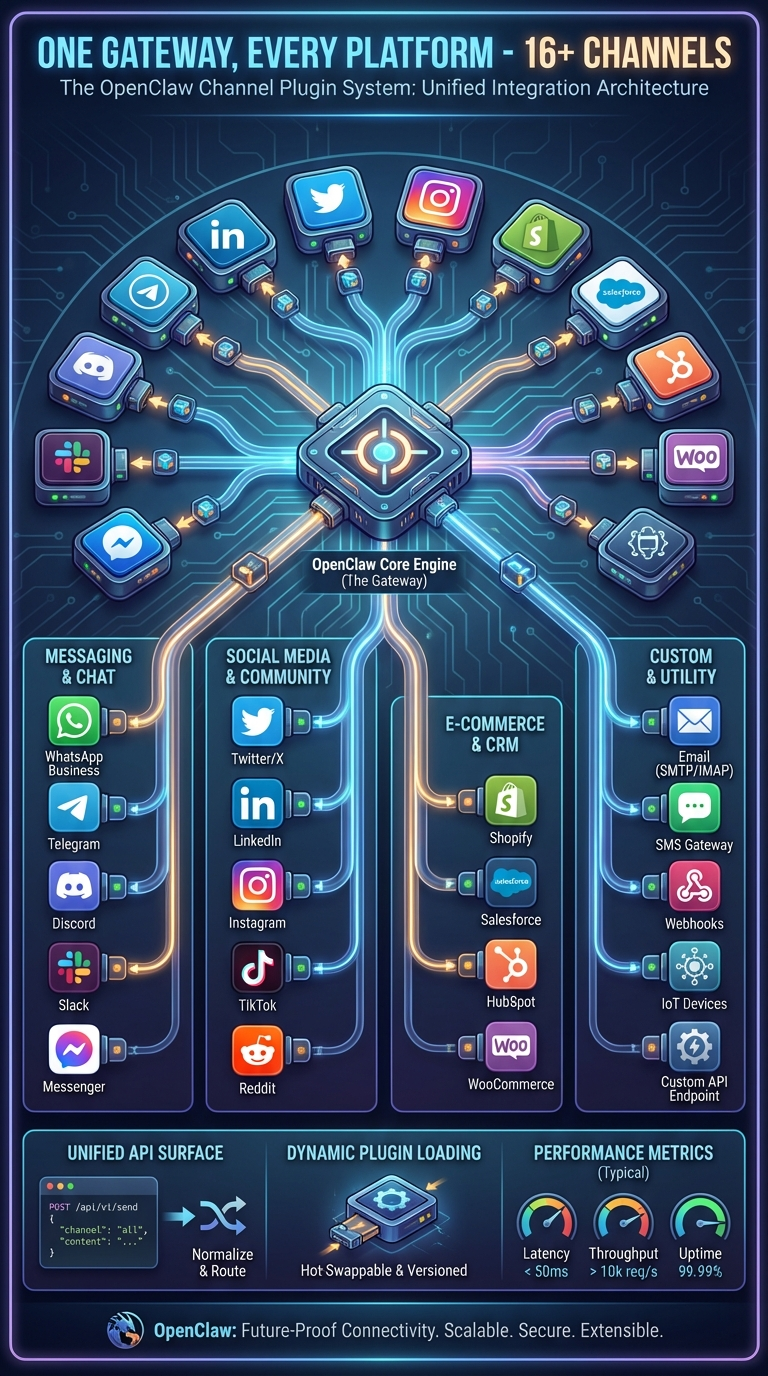
This infographic — "One Gateway, Every Platform — 16+ Channels" — shows the OpenClaw Core Engine at the center with connections radiating out to Messaging & Chat, Social Media & Community, E-Commerce & CRM, and Custom channels.
The ChannelPlugin Interface
Every platform integration implements the ChannelPlugin interface defined in src/channels/plugins/types.plugin.ts. This is the contract that makes unified multi-channel possible — a comprehensive type with 22 adapter slots:
type ChannelPlugin<ResolvedAccount, Probe, Audit> = {
  id: ChannelId;
  meta: ChannelMeta;
  capabilities: ChannelCapabilities;
  config: ChannelConfigAdapter;          // Required - account resolution
  outbound?: ChannelOutboundAdapter;     // Message delivery
  status?: ChannelStatusAdapter;         // Health checks
  setup?: ChannelSetupAdapter;           // Config wizard
  security?: ChannelSecurityAdapter;     // DM policies
  groups?: ChannelGroupAdapter;          // Group handling
  mentions?: ChannelMentionAdapter;      // @mention detection
  streaming?: ChannelStreamingAdapter;   // Typing indicators
  threading?: ChannelThreadingAdapter;   // Reply-to support
  messaging?: ChannelMessagingAdapter;   // Rich formatting
  actions?: ChannelMessageActionAdapter; // React/edit/unsend
  heartbeat?: ChannelHeartbeatAdapter;   // Keepalive
  agentTools?: ChannelAgentToolFactory;  // Channel-specific tools
  directory?: ChannelDirectoryAdapter;   // Contact lookup
  gateway?: ChannelGatewayAdapter;       // Custom RPC methods
  // + 5 more adapters
};
The 34 Bundled Extensions
| Category | Extensions |
|---|---|
| Messaging | WhatsApp, Signal, iMessage, LINE, Matrix, MS Teams, Nostr, Google Chat, Feishu, Zalo, Mattermost, Nextcloud Talk, Tlon, Twitch |
| Voice | voice-call, talk-voice, phone-control |
| Memory | memory-core, memory-lancedb |
| Auth | google-antigravity-auth, google-gemini-cli-auth, minimax-portal-auth, copilot-proxy |
| Tools | llm-task, open-prose, lobster |
| Infra | device-pair, diagnostics-otel |
What the Bottom Bar Means
Unified API Surface: The plugin SDK exports 390+ types. This is the only stable API surface.
Dynamic Plugin Loading: Plugins discovered via Jiti from four paths in precedence order — config paths, workspace extensions, global extensions, bundled extensions.
Performance Metrics: Channel health via ChannelStatusAdapter — probe, audit, and issue reporting.
Channel-specific notes from the docs:
- WhatsApp: "Multiple WhatsApp accounts in one Gateway process. Login via QR."
- Telegram: "Production-ready via grammY. Long-polling by default; webhook optional."
- Discord: "Guild channels stay isolated as
agent:<agentId>:discord:channel:<channelId>."
5. Native Apps: Your AI Everywhere
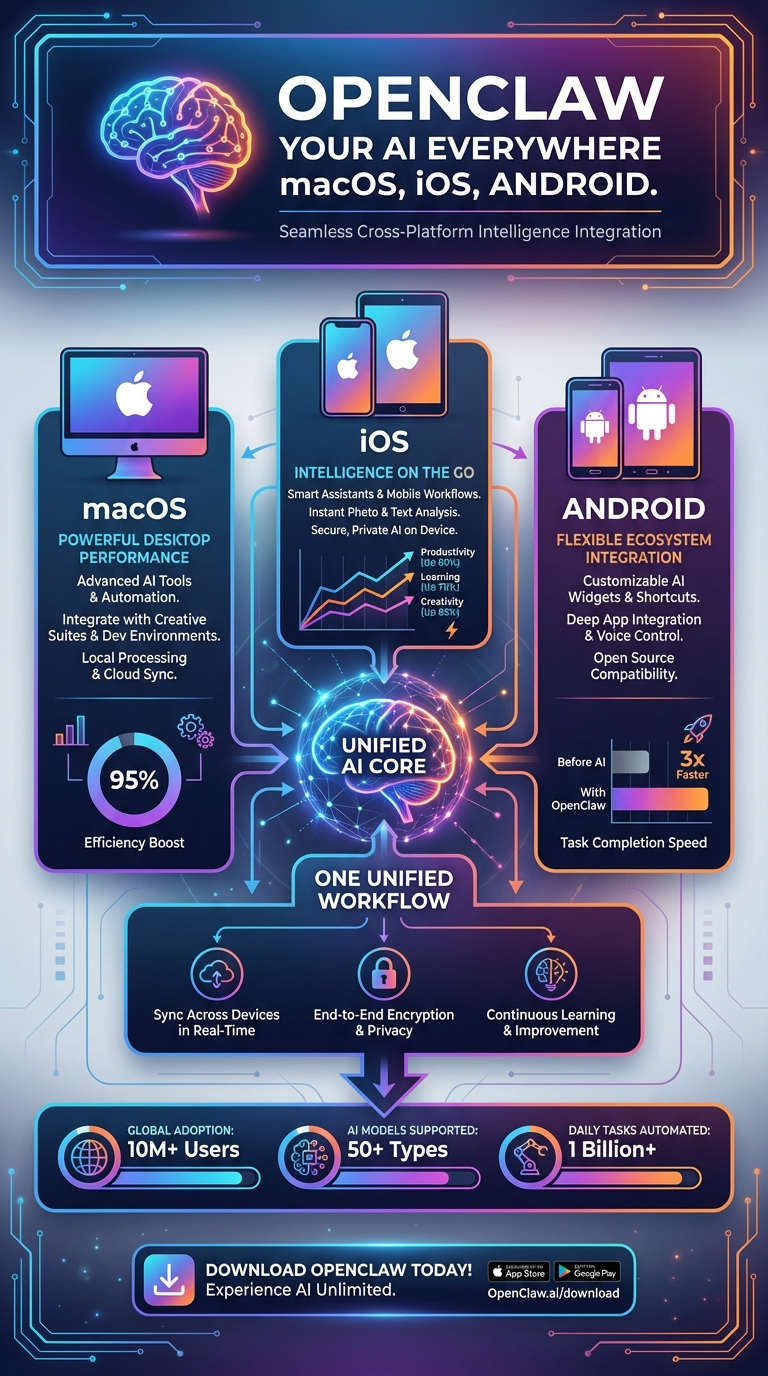
This infographic — "OpenClaw Your AI Everywhere: macOS, iOS, Android" — shows the three native apps converging on a "Unified AI Core."
What Native Apps Actually Are
In the OpenClaw architecture, native apps aren't just chat clients. They're nodes — devices that register with the gateway and expose hardware capabilities.
"A node is a companion device that connects to the Gateway WebSocket with
role: 'node'and exposes a command surface vianode.invoke."
macOS App — 297 Swift Files
Location: apps/macos/ | Framework: SwiftUI + Combine | Type: Menu bar app
Key source files:
- GatewayConnection.swift — WebSocket client (Gateway Protocol v3)
- GatewayProcessManager.swift — Embedded gateway management
- VoiceWakeRuntime.swift — Voice wake system ("Hey OpenClaw")
- TalkModeController.swift — Continuous voice conversation
- ScreenRecordService.swift — Screen recording capability
- CameraCaptureService.swift — Camera capture
- CanvasManager.swift — A2UI canvas orchestration
- Sparkle auto-updates, LaunchAgent auto-start
iOS App — 63 Swift Files
Location: apps/ios/ | Framework: SwiftUI | Shared code: OpenClawKit
Device capabilities exposed as agent tools:
| Service | Capability |
|---|---|
Camera/ |
Front + rear camera capture |
Location/ |
GPS coordinates, geocoding |
Contacts/ |
Contact search and access |
Calendar/ |
Calendar event queries |
Motion/ |
Accelerometer, gyroscope |
Screen/ |
Screen capture |
Media/ |
Photo/video library |
Reminders/ |
Reminders access |
Android App — 63 Kotlin Files
Location: apps/android/ | Framework: Jetpack Compose + Hilt DI
Key files: NodeForegroundService.kt (persistent connection), CameraHudState.kt, LocationMode.kt, VoiceWakeMode.kt + WakeWords.kt, SecurePrefs.kt (encrypted storage).
Device Capabilities Matrix
| Capability | macOS | iOS | Android |
|---|---|---|---|
| Camera capture | Yes | Yes | Yes |
| Screen recording | Yes | Yes | Yes |
| GPS location | — | Yes | Yes |
| Contacts | — | Yes | — |
| Calendar | — | Yes | — |
| Health data | — | Yes | — |
| Motion sensors | — | Yes | Yes |
| Voice wake | Yes | Yes | Yes |
| Talk mode | Yes | Yes | Yes |
6. Security & Configuration: Defense in Depth
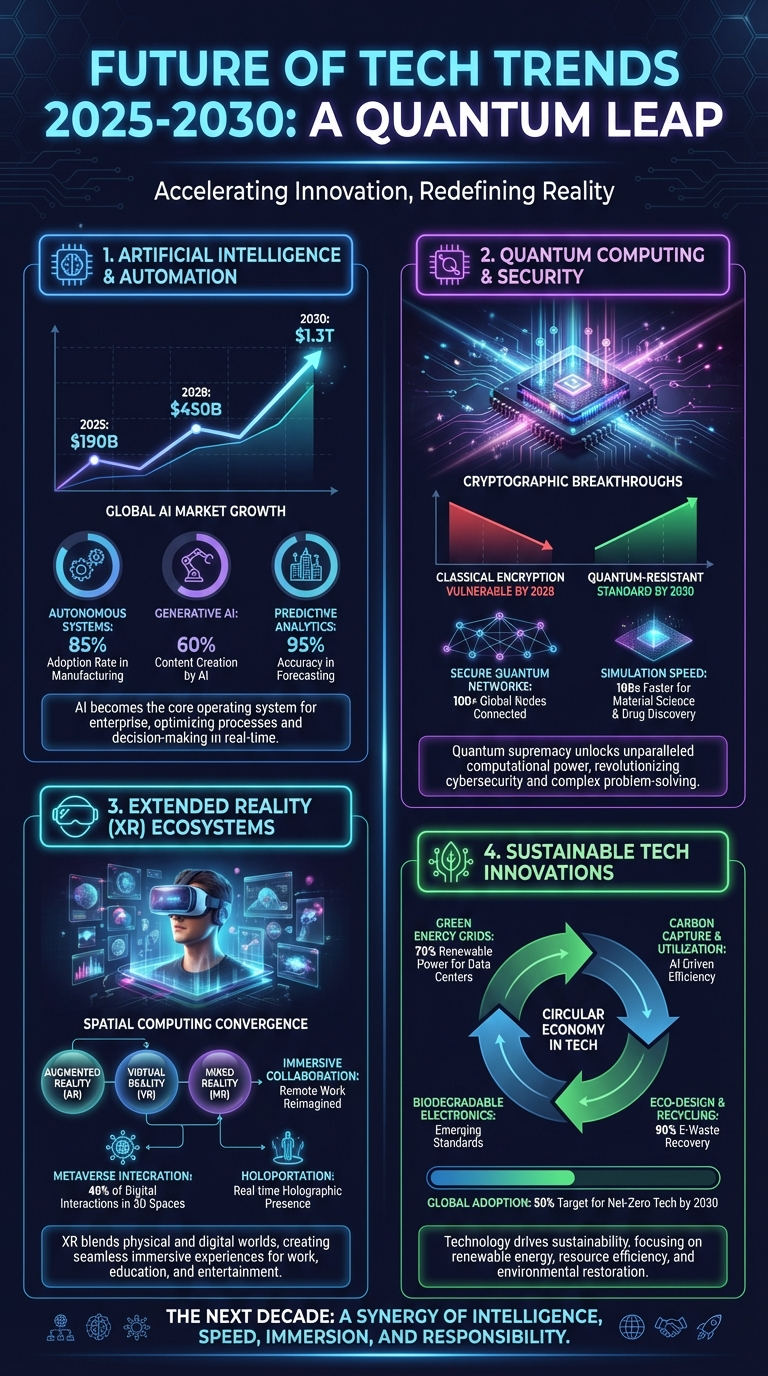
The sixth infographic places OpenClaw within the broader technology landscape — the accelerating convergence of AI, quantum computing, XR, and sustainable tech. This context is important because OpenClaw's security architecture must defend against an evolving threat landscape. Here's what the codebase actually implements.
The 9-Layer Tool Policy Engine
OpenClaw's security crown jewel in src/agents/tool-policy.ts — nine layers evaluated in order, a deny at any layer blocks the tool:
- Profile policy — Base access level (minimal, coding, messaging, full)
- Provider-specific profile — Override by LLM provider
- Global policy — Project-wide allow/deny rules
- Provider-specific global — Provider overrides on global
- Per-agent policy — Agent-specific tool access
- Agent provider policy — Provider overrides per agent
- Group policy — Channel/sender-based restrictions
- Sandbox policy — Docker isolation restrictions
- Subagent policy — Child agent propagation (always equal or fewer than parent)
Security Audit — 30+ Automated Checks
src/security/audit.ts runs checks across:
- Filesystem: State directory permissions, config file permissions, symlink detection
- Gateway: Bind mode validation, authentication config, token strength
- Channels: DM policy enforcement, group policy, allowlist verification
- Execution: Exec security modes (
deny,allowlist,full), safe bins whitelist - Skills: Pattern-based vulnerability detection in
src/security/skill-scanner.ts - Content: Prompt injection detection with 15+ patterns in
src/security/sanitize.ts
SSRF Protection
src/infra/net/ssrf.ts — DNS pinning via createPinnedDispatcher():
- Blocks private IPs, IPv6 link-local, metadata endpoints
- Configurable hostname allowlist
Exec Approval System
src/infra/exec-approvals.ts:
- Unix socket authentication at
~/.openclaw/exec-approvals.sock - Glob-style pattern matching for allowlists
- Modes:
off,on-miss,always
Configuration System — 200+ Fields
src/config/schema.ts with 25 sections: gateway, agents, tools, models, channels, skills, plugins, security, cron, browser, voice, and more.
"OpenClaw only accepts configurations that fully match the schema. Unknown keys, malformed types, or invalid values cause the Gateway to refuse to start for safety."
How These Layers Work Together
The six infographics aren't isolated views — they're slices of a single coherent system:
- A message arrives through a channel (Infographic 4)
- The gateway pipeline processes it (Infographic 3)
- The agent engine reasons and selects tools (Infographic 2)
- The response flows through the full architecture stack (Infographic 1)
- Native apps can be invoked as tool targets (Infographic 5)
- Security policies gate every interaction (Infographic 6)
The Numbers
| Metric | Count |
|---|---|
| Total source files | 4,885 |
| Total tokens | 6,832,044 |
| Channel integrations | 20+ |
| Agent tools | 60+ |
| Plugin extensions | 34 |
| Gateway RPC methods | 70+ |
| Tool policy layers | 9 |
| Security audit checks | 30+ |
| CLI commands | 50+ |
| Test files | 971 |
| Config schema fields | 200+ |
| Plugin SDK type exports | 390+ |
What This Means for Builders
Building an agent management service? Start with the Gateway (Infographic 3). Connect via WebSocket to port 18789 with JSON-RPC.
Adding a new messaging platform? Start with Channels (Infographic 4). Implement ChannelPlugin — config, outbound, status adapters minimum.
Customizing agent behavior? Start with the Agent Engine (Infographic 2). The system prompt builder and SOUL.md persona files are your entry points.
Deploying at scale? Start with Security (Infographic 6). The 9-layer tool policy and Docker sandboxing are production essentials.
Building a native app? Start with Native Apps (Infographic 5). Study OpenClawKit for Gateway Protocol v3.
The code is open. The architecture is documented. The infographics are your visual index.
Now go build something on it.
This analysis is based on a complete mapping of the OpenClaw repository — 4,885 files and 6.8 million tokens — cross-referenced with official documentation.
The Global Builders Club runs weekly workshops on OpenClaw deployment, plugin development, and agent infrastructure. Join us at globalbuilders.club.
Written by
Global Builders Club
Global Builders Club
If you found this content valuable, consider donating with crypto.
Suggested Donation: $5-15
Donation Wallet:
0xEc8d88...6EBdF8Accepts:
Supported Chains:
Your support helps Global Builders Club continue creating valuable content and events for the community.